Every week a business owner tells me the same thing: "I know we should be doing something with AI, but I don't have a developer." Usually right after showing me the password taped to their monitor or on a yellow post it note under your keyboard. One crisis at a time, folks.
Here's the truth after 30+ years of helping small businesses wrangle technology: you don't need a developer. You need off-the-shelf tools, a few hundred bucks a month, and whichever employee everyone calls when the printer acts up. That's your project team.
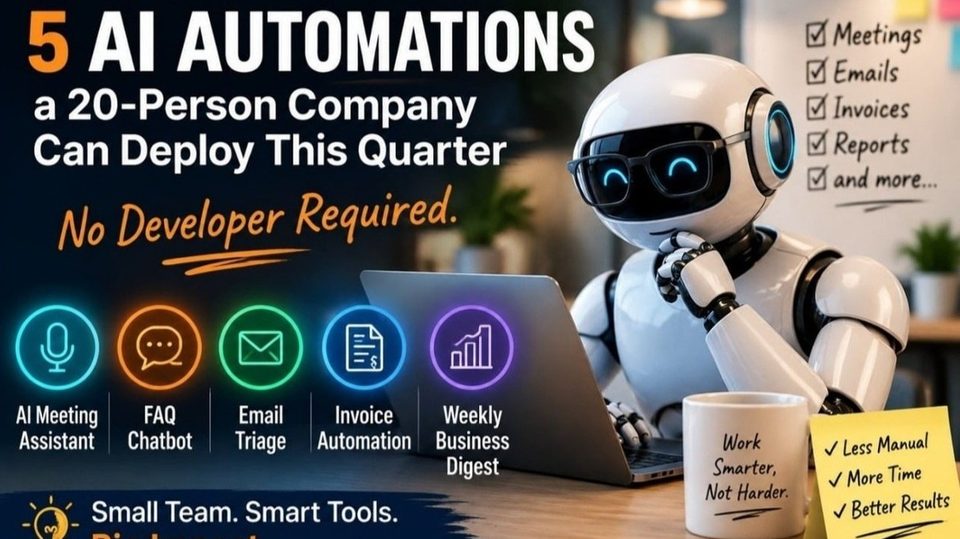
Here are the five automations I recommend most, in the order I would deploy them.
1. An AI Meeting Assistant
The problem: The meeting ends, nobody wrote anything down, and two weeks later you're all playing "I thought you were taking notes" the least fun game in business.
The fix: A meeting bot like Fireflies, Otter, or Fathom joins your calls, transcribes, summarizes, and drafts the follow-up email with names attached to action items.
Time & cost: An afternoon. Free to ~$20/user/month and only for people who actually run meetings.
The catch: Tell clients the notes bot is on the call. "Surprise, a robot has been listening" is not a trust builder.
2. An FAQ Chatbot Trained on YOUR information
The problem: Your team answers the same 15 questions all day. (Yes, one of them is password resets. It's always the passwords.)
The fix: Point a no-code chatbot like Intercom Fin, Chatbase, or Zendesk AI at your website and help docs. It answers from your material and hands off to a human when stumped.
Time & cost: 1–2 weeks mostly spent fixing your documentation. If your docs still show 2019 pricing, congratulations: you've built a very polite robot that quotes 2019 pricing. $50–$300/month.
The catch: Configure it to say "let me connect you with someone" instead of guessing. A chatbot that invents a refund policy is worse than no chatbot, ask the big companies who learned that with expensive lawyers.
3. Email Triage for Your Drowning Inboxes
The problem: Important emails age like milk while "URGENT: your car warranty" somehow always gets read.
The fix: The AI already in your email Copilot for Outlook or Gemini for Gmail categorizing, flagging, and drafting replies. For shared inboxes, Front or Missive add AI routing.
Time & cost: A week. ~$20–$30/user/month, for the two or three inboxes that actually need it.
The catch: AI writes, a human clicks send. Every AI email horror story starts with someone skipping that step.
4. Invoice Data Entry That Does Itself
The problem: It's 2026. We put a rover on Mars, and Heather is still keying in invoice line items by hand.
The fix: AI extraction in tools you may already own Dext, Ramp, or the AI import features in QuickBooks and Xero. Invoices go to an email address; the AI reads, extracts, and stages for approval.
Time & cost: 2–3 weeks including testing. $30–$100/month less than one hour of the bookkeeping time it saves weekly. Brenda gets promoted to work that needs a brain.
The catch: Set human approval is needed above a dollar amount. "Excellent" isn't "perfect," and this is your money.
5. A Weekly Business Digest That Writes Itself
The problem: The owner has no time to chase status updates, and the team would rather clean the office microwave than write them.
The fix: Zapier, Make, or n8n connected to your CRM and accounting software, with an AI step that summarizes the week. Delivery is Friday at 4 p.m., right as you're pretending you'll do "one more thing" before the weekend.
Time & cost: 2–4 weeks. $30–$100/month. It's the most ambitious one, which is why it's last.
The catch: Start with one or two data sources, not seven. A simple digest that shows up every Friday beats a magnificent one that quietly dies in month two.
The Four Rules That Make It All Work
One owner per automation. Not a committee. Committees are where automations go to die. Work it, improve it, then you can share it. Human in the loop. Think of AI as a brilliant intern with a credit card. Capable, overconfident, supervised. This is non-negotiable, I have scars. Write a one-page AI policy first. It takes an hour and prevents the "someone pasted our client list into a free chatbot" conversation. Great place for an AI to assist. Measure one number per automation. Start with one KPI let me say that again Start with one KPI – get it right then add another one at a time, don’t try to boil the ocean.
Start Monday Morning
Deploy #1 this week it's an afternoon of work, and the quick win buys you credibility for the other four. Total budget for all five: $300–$700/month, roughly the labor of a part-time hire. Except this one never calls in sick, never touches the thermostat, and never once reheats fish in the microwave.
And if your data or security posture isn't ready for any of this? That's not a reason to wait, that's your real first project. (I happen to know some folks who can help.)
Please start your AI journey now, take the first step that is the spark that will start the AI fire.
What's the first process you'd hand to an AI? Tell me in the comments, I read every one. Unlike my email, which, per item #3, is now triaged by my AI called Pepper (yea, all my AI’s are Ironman References).
Originally published by Mark Putiyon on LinkedIn. Join the discussion there.
Read on LinkedInFounder of Technology Innovation Partners — 30+ years helping businesses secure and modernize their IT.