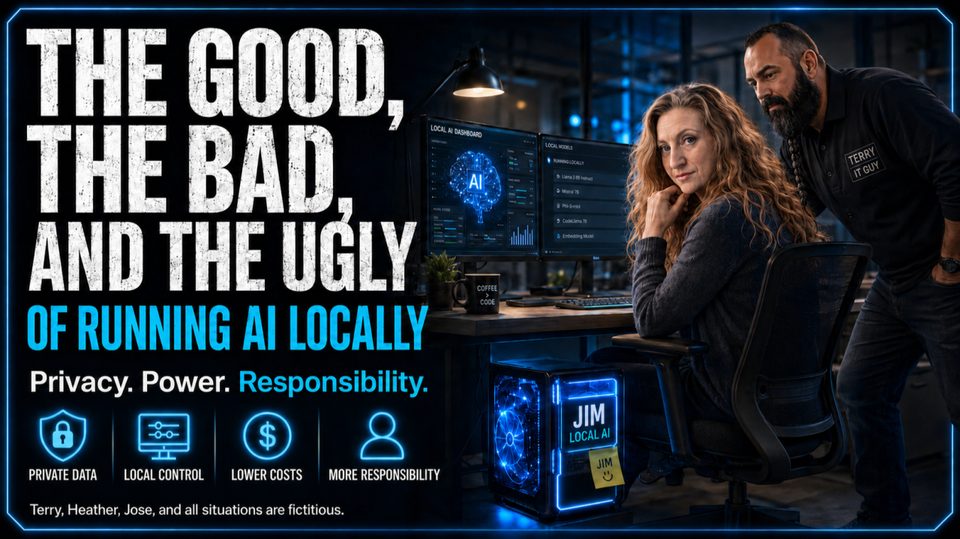
The Good, the Bad, and the Ugly of Running AI Locally
Author’s note: Terry, Heather, Jim, and all situations described here are fictitious.
For the past few years, using AI has usually meant sending your questions, documents, meeting notes, source code, and occasionally your company’s deepest secrets to somebody else’s cloud. It is convenient. It is powerful. And it requires trust, a lot of it. But another option, running AI locally. Instead of sending everything to the top frontier models like ChatGPT, Opus, Gemini and Grok, the model runs on your hardware. In Heather’s case, it lives under her desk.
Heather works in accounting. She asked Terry, the IT guy, whether she could have “one of those private AI things” to help review documents and answer questions about company procedures. Terry heard private, nodded, and disappeared for a few days. He returned with a black computer tower, several cables, and a fan that sounded like and airplane taking off at Dulles airport. “It all runs locally,” Terry explained. Heather looked under her desk. Heather: “So the AI lives down there?” Terry: “Technically, yes.” Heather named it Jim. And that is where the real lesson begins.
The Good
The strongest argument for local AI is control and privacy. When set up properly (with guardrails), prompts, documents, financial information, source code, and internal procedures can stay on your hardware. Heather can ask Jim to summarize a company policy, compare two documents, or search for accounting procedures without uploading those files to an outside service. That does not automatically make the system secure. But from a control standpoint, the appeal is obvious. The AI is inside the company. You choose the model. You decide when it gets updated. You control what it can access.
If the internet goes down, Jim keeps working. Local AI can also make financial sense when it is used correctly. Cloud tools feel cheap during experiments. Then the company scales usage and discovers its helpful assistant has the spending habits of a teenager with a corporate card. With local AI, much of the cost moves up front: hardware, setup, electricity, and maintenance. After that, Heather can rewrite an email for the sixth time without worrying about token usage (cost).
The Bad
“Run AI locally” sounds simple. Download a model. Click a button. Become an AI company. Unfortunately, Heather’s computer is not a billion-dollar data center.
Hardware matters. A smaller model may run quickly and still struggle with long documents or multi-step work. A larger model may answer better and still require enough hardware to make accounting wonder whether Terry is mining cryptocurrency.
This creates one of the most important rules in local AI: just because a model can technically run on your computer does not mean you will enjoy watching it run.
Heather learned that in week one. She gave Jim a large set of internal documents and asked for a detailed comparison. The fan accelerated. Jim began answering at roughly the speed Heather types with one finger while holding a sandwich in the other hand. After four minutes, it had produced: “Based on the documents provided. . . ” Heather looked over the cubicle wall. “Terry?” “It’s thinking. It sounds like it’s preparing for takeoff.” Terry: “That means it’s working.”
Local models have improved dramatically, and many are very capable. They are still not equal to the strongest cloud systems. For routine document work, internal search, first drafts, and structured tasks, local AI can perform well with the right hardware. For advanced reasoning or moments when the best available answer matters more than unit cost, cloud models win. That is not failure. That is matching the tool to the job.
The Ugly
This is the part local AI demos often skip. When you move AI onto your own hardware, you gain control, but you also gain responsibility. The cloud provider used to handle servers, backups, updates, monitoring, patches, and the occasional 2:00 a.m. emergency. Now Terry handles those things.
Models need updates. Software needs patches. Storage fills up. Hardware fails. Access has got to be controlled. Backups have got to work. Local does not automatically mean secure. It only means local. A local system still needs encryption, authentication, permissions, backups, updates, retention rules, and monitoring. It also needs someone to decide what the AI is allowed to see and do.
An AI agent that produces a bad answer is frustrating. An AI agent with permission to edit files, send emails, or touch financial systems can produce a bad answer and then act on it at machine speed. Heather eventually asked Jim to connect directly to the accounting system. Jim was able to connect, When Terry found out, he scowls and removes AI access to the accounting system and explains the damage Jim could cause in the accounting system with no guardrails defined.
AI agents should be treated like very enthusiastic new employees. They can be fast, capable, and helpful. You would not give new hires admin access, customer email rights, and the ability to delete company files on day one, right? Do not give those permissions to the AI under a desk simply because Jim sounds friendly.
The Bottom Line
Local AI makes sense when privacy, control, offline access, or predictable cost matter most. Cloud AI makes sense when you need maximum performance, minimal maintenance, and the newest capabilities. For many businesses, the answer will not be local or cloud. It will be local and cloud.
Do not start by announcing to the staff that we are now using local AI, only. Start with one practical workflow that is repetitive and low risk. Heather does not care how many parameters the model has and how much VRAM is needed. She wants to know whether Jim can find the correct expense policy.
Heather loves having the AI hardware, aka Jim, under her desk. The smartest organizations will not ask whether all AI should run locally. They will ask a better question: Which work should stay inside the building, and which work still belongs in the cloud?
Would you trust a local AI system living under Heather’s desk? More importantly, what is the first task you are going to let Jim handle? Please put your answer below, I do read them all.
Originally published by Mark Putiyon on LinkedIn. Join the discussion there.
Read on LinkedInFounder of Technology Innovation Partners — 30+ years helping businesses secure and modernize their IT.